
Some links in this article are affiliate links. As an Amazon Associate, rcplanediy.com/ earns from qualifying purchases at no extra cost to you.
So you’ve been flying RC planes for a while and somewhere along the way someone mentioned “autopilot” and now you can’t stop thinking about it. Fair enough — it’s one of those rabbit holes that starts with “I just want a return-to-home button” and ends with you spending a weekend configuring waypoint missions at the kitchen table while your wife gives you that look. I’ve been there.
GPS and autopilot systems for RC airplanes have come a long way in the last few years. What used to require expensive dedicated hardware and serious electronics knowledge is now genuinely accessible to the serious hobbyist — not necessarily easy, let’s be honest about that, but accessible. ArduPilot in particular is a community-developed open-source platform that runs on multiple hardware options and has more features than most of us will ever use.
This guide breaks down the main components you need — flight controllers, GPS modules, telemetry radios — organized by experience level and use case. Whether you want a basic flight stabilizer with return-to-home, or you’re going deep on autonomous waypoint missions, there’s a setup here for you. I’ve stuck to products actually available on Amazon with decent review counts because, honestly, tracking down niche RC electronics is its own hobby and not one I’m recommending.
⚡ Quick Picks at a Glance
- Best Budget Autopilot FC: HAWK’S WORK Pixhawk PX4 2.4.8 (no GPS)
- Best FC + GPS Combo: Pixhawk PX4 2.4.8 with NEO-M8N GPS + 915MHz Telemetry Bundle
- Best Fixed-Wing Dedicated FC: Matek F405-Wing V2 (ArduPilot/INAV)
- Best GPS Module Standalone: Readytosky M10 GPS with Compass + Mount
- Best Telemetry Radio: FPVDrone 3DR 500mW 915MHz Telemetry Kit
What You Actually Need (And What You Don’t)
Before we get into products, let’s be clear on the ecosystem. An autopilot setup for a fixed-wing RC airplane typically involves a few separate components that work together:
Flight Controller (FC): The brain. Reads sensors, runs the autopilot software (ArduPilot or PX4), and outputs signals to your servos and ESC. This is the main computer.
GPS Module: Tells the FC where the plane is. Needed for any position-hold, return-to-home, or waypoint function. Almost all modern GPS modules also include a built-in compass (magnetometer) which the FC uses for heading.
Telemetry Radio: Optional but extremely useful. A pair of small radios — one goes on the plane, one connects to your laptop — that lets you monitor flight data in real time and even adjust parameters while flying. When something’s going wrong mid-flight, this is the difference between knowing about it and guessing.
Ground Control Software: Mission Planner (Windows) or QGroundControl (cross-platform) are the two main free options. You configure your FC, calibrate sensors, and plan waypoint missions from here.
You do NOT need all of this to start. A flight controller with GPS and the free Mission Planner software is enough for most people’s first autopilot build. Add telemetry later once you’ve got the basics sorted.
Section 1 — Entry-Level Flight Controllers: Pixhawk 2.4.8 Variants
The Pixhawk 2.4.8 is the community’s go-to affordable autopilot hardware. It’s not the latest and greatest — there are newer Pixhawk generations — but it runs current ArduPilot firmware just fine, has massive community support, and the price has come way down. If you search any RC forum for “first autopilot build,” this is what most people are running.
One honest note: the Amazon marketplace is full of Pixhawk clones of varying quality. HAWK’S WORK and Readytosky are the most consistently reviewed brands at this price point. The bare-bones clones from no-name sellers can and do have sensor calibration issues. Spend a few dollars more on a known brand — you’ll save the debugging time.
🥇 1. HAWK’S WORK Pixhawk PX4 2.4.8 Flight Controller
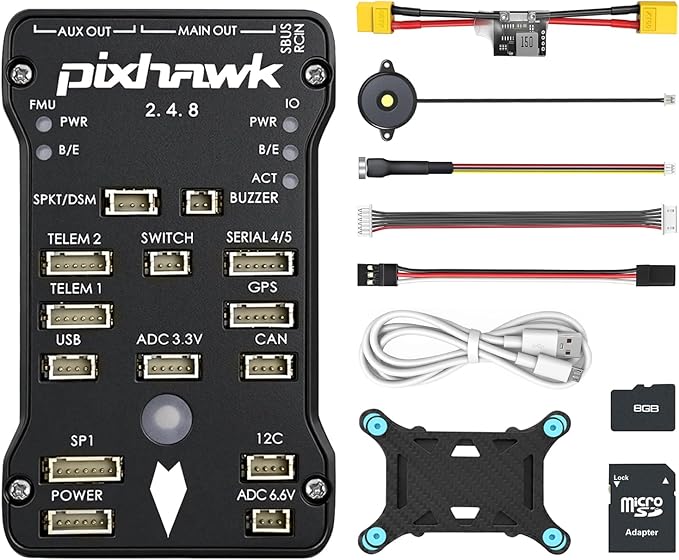
This is the most straightforward entry point — the flight controller board itself, without GPS (you buy that separately). The 32-bit STM32F427 processor runs the full ArduPlane firmware with no issues, supports 14 PWM outputs (plenty for a conventional fixed-wing), and comes with the safety switch, buzzer, SD card, and vibration damping foam already in the box. HAWK’S WORK has a good reputation for quality control compared to generic sellers.
The setup process isn’t trivial — you’ll need Mission Planner, patience, and probably a YouTube tutorial or two. But the documentation on the ArduPilot wiki is genuinely excellent, which helps.
- Processor: STM32F427 Cortex M4, 168MHz, 32-bit
- Compatible firmware: ArduPilot (ArduPlane), PX4
- PWM outputs: 14
- Includes: Power module, safety switch, buzzer, SD card, vibration damping
- Best for: First autopilot build, fixed-wing, multi-rotor, helicopter
- What’s missing: GPS module (sold separately)
The downside is that wiring everything up takes time. Also the mini USB connector is a bit fiddly — be gentle with it during the configuration phase or you’ll regret it.
2. Readytosky Pixhawk PX4 2.4.8 Flight Controller (with I2C + 4GB SD)
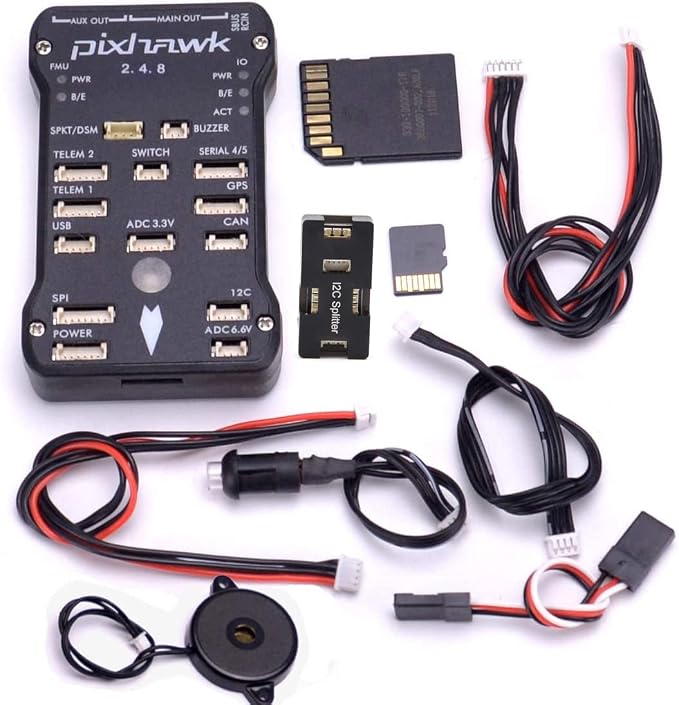
Readytosky’s version of the same controller is a long-standing option with a solid review history on Amazon. This one comes with an I2C splitter expand module — useful when you want to add a compass module or other I2C accessories later without adapter cables. The 4GB SD card is included and already formatted for flight logging.
Build quality is a small step up from the cheapest clones and Readytosky has matching accessories (GPS, telemetry) that are confirmed compatible, which is handy if you want to add everything in one order.
- Extras included: I2C splitter, buzzer, safety switch, 4GB SD
- Companion GPS (separate ASIN): B01KK9A8QG (M10 GPS)
- Companion telemetry (separate ASIN): B01DHV4DVA (3DR radio)
- Best for: Builders who want matched accessories from one brand
3. Complete Pixhawk Bundle: FC + M8N GPS + 915MHz Telemetry + OSD
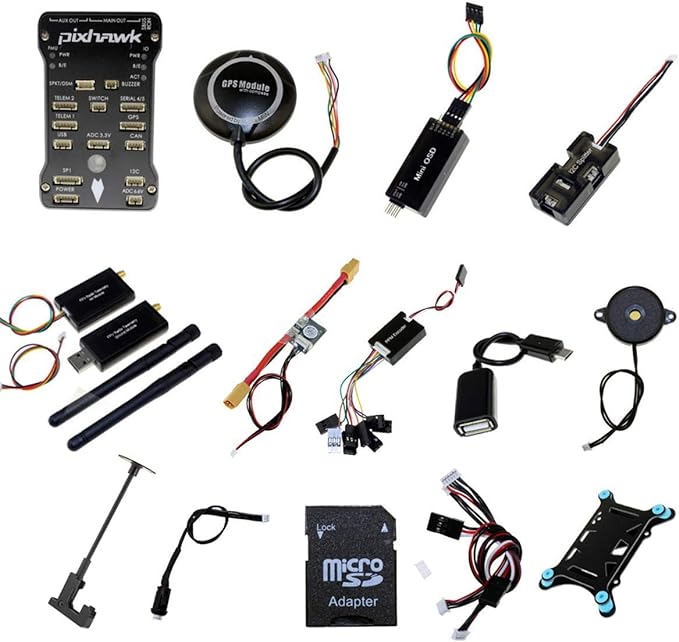
If you want to buy everything in one hit and not worry about compatibility, this bundle packages the Pixhawk 2.4.8, a NEO-M8N GPS module, a 915MHz 3DR-compatible telemetry radio set, a PPM encoder, OSD module, I2C splitter, and power module. Yes, it’s more money upfront, but everything is pre-matched and confirmed working together. For a first build this actually saves time — no connector adapter hunting required.
The OSD module (on-screen display) shows flight data on your FPV feed, which is a nice bonus if you’re flying FPV alongside the autopilot.
- Includes: Pixhawk 2.4.8, NEO-M8N GPS, 915MHz telemetry, PPM module, OSD, I2C splitter, power module, buzzer, safety switch, SD card
- GPS accuracy: ~2m CEP (NEO-M8N engine)
- Telemetry range: Up to ~1km depending on environment
- Best for: Complete first build, no-fuss single order
Section 2 — Fixed-Wing Dedicated Flight Controllers
Here’s something the generic Pixhawk guides don’t always mention: the standard Pixhawk 2.4.8 is designed around multirotor use and works fine for fixed-wing, but there are flight controllers designed specifically for airplanes. These have extra servo BECs, more intuitive fixed-wing pinouts, and sometimes better firmware support for airplane-specific features like airspeed sensors and auto-takeoff.
If you’re building a proper fixed-wing plane with ailerons, elevator, rudder, and flaps, a fixed-wing-optimized controller is worth the look.
🥇 4. Matek F405-Wing V2 Flight Controller
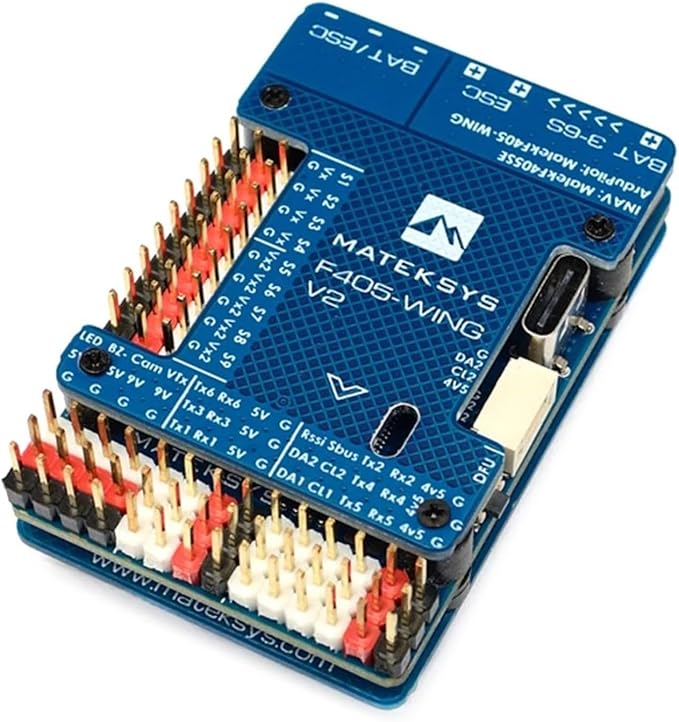
The Matek F405-Wing is the darling of the fixed-wing DIY community right now, and for good reason. It’s specifically designed for airplanes — the layout makes sense for a wing build, the servo BEC (Vx) is adjustable from 5V to 7.2V to directly power your servos without a separate UBEC, and it supports both ArduPilot (ArduPlane) and INAV firmware. The Type-C USB makes configuration at the field a lot easier.
ICM42688-P IMU is noticeably better than the older sensors on classic Pixhawks — faster response, less noise. OSD is integrated, no extra module needed. 10 PWM outputs cover aileron, elevator, rudder, flaps, throttle, and landing gear without running out of channels.
This one does require more hands-on setup than a bundle kit. You’ll need to source a GPS separately (the Matek M10Q is the obvious pairing) and handle your own wiring. But for someone building a foam plane or a flying wing who wants a proper autopilot that’s not overkill, this is excellent value.
- MCU: STM32F405RGT6, 168MHz
- IMU: ICM42688-P
- Firmware: ArduPlane 4.4+ / INAV 6.0+
- PWM outputs: 10
- Servo BEC: Adjustable 5V / 6V / 7.2V, 5A continuous
- Input voltage: 3S–6S LiPo (9–30V)
- OSD: Integrated (AT7456E)
- Best for: Fixed-wing scratch builds, foam planes, flying wings
One thing to know: if you want INAV, you need INAV 6.0 or newer. Earlier versions won’t work on the V2. Also the Vx rail has a small quirk with the jumper pads on S5-S9 — read the Matek wiki before soldering. Not a dealbreaker, just read the docs first.
Section 3 — GPS Modules
GPS modules are one of those things where it pays to match the module to the flight controller. The connector pinout and voltage requirements vary. Here are the best standalone options that are confirmed in-stock with solid reviews.
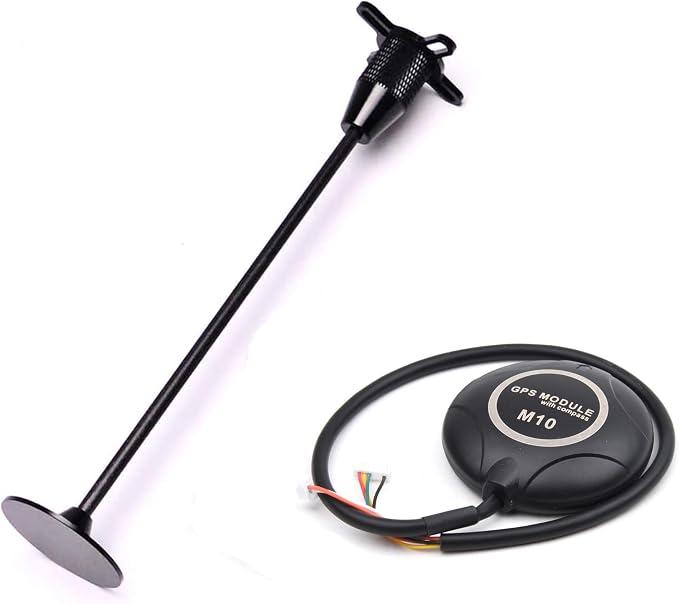
🥇 5. Readytosky M10 GPS Module with External Compass + Holder
This is the dedicated companion GPS for the Readytosky Pixhawk 2.4.8. It uses a newer-generation M10 GPS receiver with low power consumption and high precision, an external compass, and a GPS holder (mast) that keeps it elevated above your airframe electronics to reduce compass interference (which is a real problem — the compass is sensitive to motor and ESC noise).
Positioning accuracy is rated at 1.5m CEP in ideal conditions, which is plenty for return-to-home and waypoint work. Onboard flash means your configuration changes are saved and aren’t lost when the power is off. It comes pre-wired for Pixhawk — note that Readytosky says it only works with Pixhawk flight controllers, so this isn’t the pick for a Matek or other non-Pixhawk board.
- GPS engine: M10 generation
- Compass: External, included
- Mount: GPS holder included
- Accuracy: 1.5m CEP (ideal environment)
- Config storage: Onboard flash
- Compatible: Pixhawk 2.4.8 (Pixhawk flight controllers only)
One bit of honest feedback from the review section: the compass on some units has been inconsistent. If yours won’t calibrate properly after a few attempts, it might be a defective unit. Readytosky’s customer service has generally handled replacements okay from what I’ve seen in forums.
6. QWinOut Mini M8N GPS Module (Compact Format)
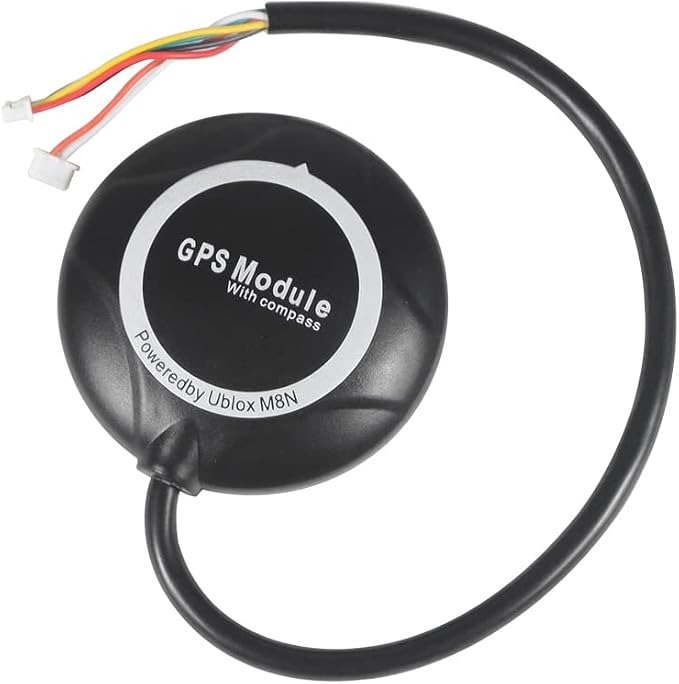
For builds where weight and size are tight — smaller foamies, flying wings, lightweight trainers — the QWinOut mini M8N is a popular option. It uses the same NEO-M8N chip in a considerably smaller package (18g) than the standard module. Comes with a connector for both APM and Pixhawk pinouts in the box, which is actually useful if you’re not sure which you’ll end up using.
- Weight: ~18g
- GPS chip: NEO-M8N
- Multi-GNSS: GPS + BDS + SBAS or GPS + GLONASS + SBAS
- Connectors included: APM 5-pin and Pixhawk 6-pin
- Best for: Lightweight builds, space-constrained fuselages
7. Radiolink M10N SE100 GPS Module
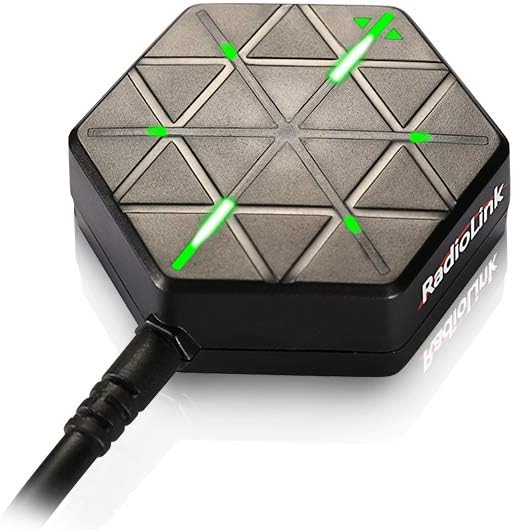
Radiolink’s own GPS unit with the newer u-blox M10050 chip — a generation newer than the M8N and noticeably faster at cold start. Quad-mode positioning (GPS + GLONASS + BeiDou + Galileo simultaneously) gets you more satellites faster, which matters most when you’re standing in a field in winter with your hands going numb waiting for the GPS lock light to come on.
Specifically designed to pair with Radiolink flight controllers (Mini PIX, Crossflight, PIXHAWK) and the connector goes straight in without any adapter. The 6-pin connector is compatible across the Radiolink ecosystem.
- GPS chip: u-blox M10050
- Positioning: GPS + GLONASS + BeiDou + Galileo
- Accuracy: ~50cm (quad-mode), ~250cm single mode
- Anti-interference: Two-stage 78dB filtering
- Best for: Radiolink FC users, faster satellite acquisition
Section 4 — Telemetry Radios
I can’t stress enough how useful a telemetry link is for autopilot work. Being able to see exactly what the FC is doing — GPS satellite count, battery voltage, flight mode, attitude — from Mission Planner while you’re standing at the field is invaluable. When something goes wrong (and it will), you’ll know immediately rather than landing to check logs.
The 915MHz band is standard in the US. The 433MHz version is used in Europe. Make sure you get the right frequency for your country.
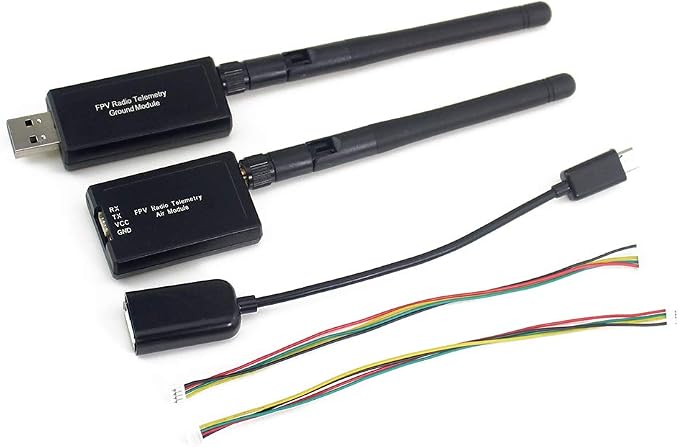
🥇 8. FPVDrone 500mW 915MHz Telemetry Kit
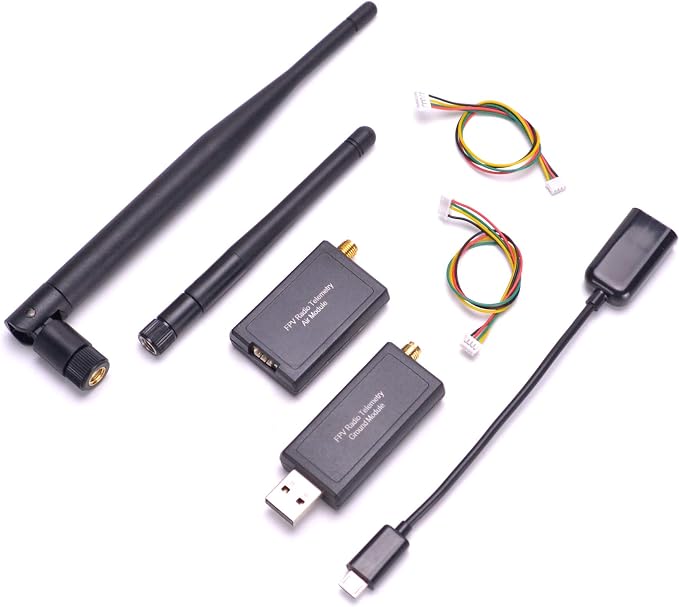
FPVDrone has been selling this 3DR-compatible radio kit for years and it has a substantial review count on Amazon. 500mW output gives you solid range — practical effective range is around 300–500m which is plenty for most flying fields. Based on the open-source SiK firmware, so you can actually read and update the firmware yourself if needed, and it works with both Mission Planner and QGroundControl out of the box.
One air radio plugs into your Pixhawk TELEM port; the ground radio connects via USB to your laptop. Setup takes about five minutes once Mission Planner is installed.
- Frequency: 915MHz
- Power: 500mW
- Firmware: Open-source SiK
- Compatible: APM 2.6/2.8, Pixhawk, any ArduPilot FC
- Ground unit: USB connection for laptop
- Best for: Standard field use, Mission Planner monitoring, parameter tuning
9. 3DR 500mW 915MHz Telemetry Kit (Pre-Configured)
This seller pre-configures the radios to 115200 baud, which is the correct rate for Pixhawk connections — saves the step of setting it up yourself. The 3DR radio design is effectively the standard for Pixhawk-ecosystem telemetry, and this version includes OTG cable support for Android tablets or phones running QGroundControl, which is actually a useful option if you don’t want to bring a laptop to the field.
- Baud rate: Pre-set to 115200 for Pixhawk
- OTG support: Yes (Android tablet/phone compatible)
- Frequency: 915MHz
- Best for: Pixhawk builders who want a plug-and-play option
Section 5 — Advanced / Pro Systems
For builders who want to go further — longer range missions, higher processing power, newer sensor generation — this represents the next step up from the entry-level Pixhawk ecosystem.
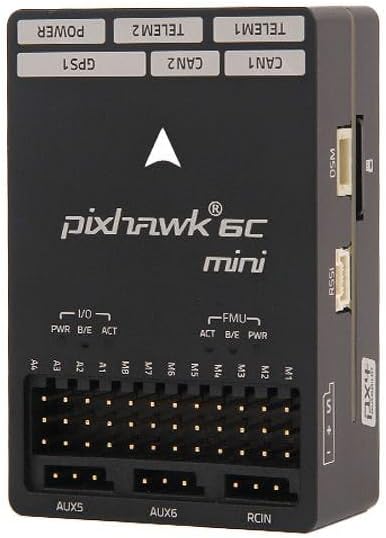
10. Pixhawk 6C Mini Flight Controller (STM32H743)
This is the genuinely modern option. The Pixhawk 6C Mini uses the STM32H743 processor running at 480MHz — significantly more computing power than the older STM32F427 in the 2.4.8. Dual IMUs (ICM-42688-P + BMI055), temperature-controlled to keep calibration stable, and vibration isolation built in. Runs PX4 1.14+ and ArduPilot 4.3+ natively.
The price is higher, but if you’re doing anything beyond basic return-to-home — proper autonomous missions, VTOL, anything involving rapid attitude changes — the processing headroom matters. This is where you go when the 2.4.8 starts feeling like a bottleneck.
- Processor: STM32H743, 480MHz, 2MB flash, 1MB SRAM
- IMUs: Dual ICM-42688-P + BMI055 with temperature control
- Firmware: PX4 1.14+ / ArduPilot 4.3+
- PWM mode: Hardware switchable 3.3V/5V
- Best for: Advanced builders, complex missions, VTOL
Quick Comparison Table
| Product | Type | Firmware | GPS Included | Best For |
|---|---|---|---|---|
| HAWK’S WORK Pixhawk 2.4.8 | FC only | ArduPilot / PX4 | No | First build, budget |
| Readytosky Pixhawk 2.4.8 | FC only | ArduPilot / PX4 | No | Matched accessory ecosystem |
| Complete Pixhawk Bundle | FC + GPS + Telemetry | ArduPilot / PX4 | Yes (M8N) | No-fuss first build |
| Matek F405-Wing V2 | Fixed-wing FC | ArduPlane / INAV | No | Fixed-wing dedicated |
| Readytosky M10 GPS | GPS module | — | — | Pixhawk companion GPS |
| QWinOut Mini M8N GPS | GPS module | — | — | Lightweight/compact builds |
| Radiolink M10N SE100 GPS | GPS module | — | — | Radiolink FC users |
| FPVDrone 500mW Telemetry | Telemetry radio | SiK | — | Standard field use |
| 3DR 500mW Telemetry Kit | Telemetry radio | SiK pre-configured | — | Plug-and-play setup |
| Pixhawk 6C Mini (H743) | Advanced FC | PX4 / ArduPilot | No | Advanced missions, VTOL |
Frequently Asked Questions
Can I add GPS autopilot to any RC airplane?
In theory, yes. In practice, your airframe needs to be reasonably stable and have enough payload capacity for the electronics — typically around 80–150g for a basic flight controller + GPS setup. Most foam park flyers and trainer-sized models can handle this. Smaller micro planes and ultra-light models get tricky. The autopilot also needs at least 3–4 PWM channels to control the plane (throttle + at least 2 control surfaces), so you need a flight controller with enough outputs.
What’s the difference between ArduPilot and PX4?
Both are open-source autopilot software stacks that run on the same hardware (Pixhawk, Matek F405, etc.). ArduPilot is generally considered more mature for fixed-wing aircraft — ArduPlane has been around longer and has more fixed-wing-specific features like auto-landing and airspeed sensor support. PX4 has a more modern codebase and is popular in the drone industry. For hobby RC airplane use, ArduPilot is usually the better starting point. The communities are both active and helpful.
Do I need a telemetry radio?
No, but you’ll miss it when you don’t have one. You can configure everything over USB, and the SD card logs all flight data that you can review afterward. But being able to see real-time battery voltage, GPS satellite count, and flight mode while standing at the field is genuinely useful — especially when you’re first setting up and debugging. A basic telemetry kit is not expensive; I’d include it in any first build budget.
What’s a realistic setup budget for a first autopilot RC airplane?
For a fixed-wing build, budget roughly: Pixhawk 2.4.8 (~$40–50) + M8N GPS module (~$25–35) + 915MHz telemetry (~$20–30) = roughly $85–115 for the autopilot components alone. If you go the bundle route (Section 1, product 3) you can get everything in one hit for around $80–100. The Matek F405-Wing V2 route costs similar but gives you better fixed-wing performance; add the Radiolink M10N GPS (~$25) and a telemetry kit and you’re in the same ballpark.
Is the Pixhawk 2.4.8 still worth buying in 2026?
Honestly, yes for most hobby use. The newer Pixhawk 6C/6X are faster and have better sensors, but the 2.4.8 runs current ArduPilot firmware, has enormous community support, and costs significantly less. For a first autopilot build on a foamboard or balsa trainer, a 2.4.8 is still a perfectly capable board. If you’re doing anything involving fast aircraft, VTOL, or aggressive autonomous missions, step up to the H743-based boards. For a relaxed waypoint-flying trainer? The 2.4.8 does the job fine.
Final Thoughts
If I’m being straight with you — GPS autopilot on RC planes is genuinely great once it’s working, and genuinely frustrating to set up the first time. The software side (Mission Planner, sensor calibration, first firmware flash) takes longer than any product description suggests. Budget a full weekend for your first build setup, not an afternoon.
That said, once you’ve sat at the field and watched your plane execute a waypoint mission you planned on your laptop at home — turning on cue, holding altitude, coming back to loiter overhead before landing — it’s one of those things that makes you feel pretty good about the hobby. Worth the setup pain.
For most people starting out: Matek F405-Wing V2 + Radiolink M10N GPS + FPVDrone telemetry is the best fixed-wing combination right now. The Matek is genuinely designed for airplanes, the M10N GPS is fast and accurate, and having telemetry from day one will save you hours of debugging. If budget is the priority, the complete Pixhawk 2.4.8 bundle (Section 1, product 3) gets you everything working together for less money.
Continue Reading — Related Guides
- 🔗 Best RC Transmitters for Airplane Flying: Budget to Pro Systems — Your transmitter needs to be compatible with your autopilot FC; read this before buying
- 🔗 Best LiPo Batteries for RC Airplanes — Powering your autopilot-equipped build correctly
- 🔗 Best Brushless Motors for RC Airplanes — Motor sizing for autopilot-equipped planes
- 🔗 Best FPV Cameras & Goggles for RC Airplanes — Adding FPV to your GPS-equipped fixed-wing
- 🔗 RC Airplane Materials List — Full build overview for scratch builders
- 🔗 Best RC Airplanes for Beginners — Good base aircraft to add autopilot to
As an Amazon Associate, rcplanediy.com/ earns from qualifying purchases at no extra cost to you. Prices and availability are subject to change — always verify on Amazon before purchasing.