

Some links in this article are affiliate links. As an Amazon Associate, rcplanediy.com earns from qualifying purchases at no extra cost to you.
I’m a fixed-wing guy first. Balsa, foam, a bit of glue on my fingers most weekends. But like half the people at my local field, I also own a DJI Mini, and I’ve now broken it in more ways than I’d like to admit in public. A tree branch, a rogue gust over a parking lot, one very confident landing on gravel. None of those were the drone’s fault, sadly.
Here’s the thing I learned the hard way: most drone “crashes” aren’t fatal. A chipped prop, a snapped arm hinge, a gimbal that throws an overload error — nearly all of it is fixable at the kitchen table with a small screwdriver, a spare part and about an hour of patience. What isn’t fixable is the stuff you ignore, like a puffy battery or a prop with a hairline crack that finally lets go at 80 meters.
There’s also a new reason to learn this. Since the FCC added DJI to its Covered List in December 2025, DJI can’t bring new drone models into the US. Models that were already approved — the Mini 4 Pro, Mini 5 Pro, Neo, Air 3S, Avata 2 and friends — are still legal to sell and fly, and as I write this in late September 2026 you can still buy them and their parts on Amazon. But the drone you own now is probably the one you’ll be keeping for a while, and spares are the kind of thing that quietly get harder to find. So keeping it flying is suddenly a pretty sensible hobby all on its own.
This guide goes through what actually breaks on the popular DJI models, how to diagnose it, and the parts and upgrades I’d buy — mostly for the Mini 4 Pro and Mini 3 series, because that’s what most people are flying, plus the Neo and Avata 2. If you’re coming from the plane side of the hobby, a lot of this will feel familiar. It’s just smaller screws and a lot less balsa dust.
Quick Picks
| Pick | Product | Why |
|---|---|---|
| Must-have tool | iFixit Mako Driver Kit (64 bits) | The right bits for DJI’s tiny screws, so you don’t strip them |
| Best spare to own | DJI Mini 4 Pro Intelligent Flight Battery | Batteries wear out first, and genuine is the safe bet |
| Most common repair part | Front Arm Axis (hinge) Replacement for Mini 4 Pro / Mini 3 | Fixes the floppy or snapped front arm after a hard hit |
| Best cheap prevention | Hoodman LP21 Weighted Landing Pad | Keeps grit out of motors and the gimbal on every takeoff |
What Actually Breaks on a DJI Drone (and How to Tell)
Before buying anything, figure out which of these you’re dealing with. Ordered roughly from “happens every month” to “hopefully never”.
1. Propellers. The number one casualty by a mile. Small nicks on the leading edge from grass or a light brush against a wall. Symptoms: more noise than usual, a slight wobble or “jello” in the video, the drone drifting or working harder on one side. Rule I follow — and DJI says the same — if a prop is chipped, cracked or bent, you replace it. Always. Don’t sand it, don’t glue it. And when you swap screw-on props (Mini 3 Pro, Mini 4 Pro, Neo, Avata 2), use the new screws that come with them rather than the old ones.
2. Batteries. DJI Intelligent Flight Batteries are smart but not immortal. Common complaints: a battery that won’t turn on after sitting in a drawer all winter (it self-discharged too deep), cells drifting out of balance, flight time noticeably shorter than it used to be, and — the serious one — swelling. If the case is puffed up, bulging or doesn’t sit flush in the drone anymore, stop using it. That’s not a repair, that’s recycling day.
3. Arm hinges and motor arms. On the Mini 3 and Mini 4 Pro, the front arms fold on a little hinge shaft. Hit something sideways and that hinge can crack or pop, leaving an arm that flops around or won’t lock open. Much less common is a full motor arm replacement, which you need when the arm itself is snapped or the motor is gritty/dead.
4. Motors full of grit. Land in sand or dusty dirt and the downwash sandblasts everything. A motor that sounds scratchy when you spin it by hand has debris inside. Gentle compressed air usually sorts it. Please don’t spray WD-40 or any lube in there — it just turns dust into paste.
5. Gimbal and camera. “Gimbal motor overload” is the error everyone meets eventually. Half the time it’s simply the gimbal cover still on at power-up (guilty), or a bit of grass jammed in the gimbal. After a proper crash, though, it can be a damaged gimbal ribbon cable, which is a fiddly but doable DIY job on the Mini 3 series.
6. Sensors and calibration. After any hard knock, run the IMU and compass calibration in the DJI Fly app before trusting the drone again. A surprising number of “it flies weird after the crash” problems are just calibration, not hardware.
When not to DIY: if you have DJI Care Refresh, a crashed drone under that plan is usually better sent in than opened up, since poking around inside can make things messy with DJI support. Same if the main board or the camera module itself took the hit. For everything else below, DIY is very much on the table.
If you’re looking at a crash more often than you’d like, a few hours on a simulator is cheaper than any part on this list. I covered options in our RC flight simulator guide — written for planes, but the thumbs are the same thumbs.
Propellers: Replace, Don’t Repair
Buy props in bulk. Seriously. They’re the cheapest part on the drone and the one you’ll go through the fastest, so carrying a spare set in the bag is the difference between a 5-minute fix at the field and driving home early. If you want the theory behind pitch, diameter and balance, our propeller guide covers it from the plane side.
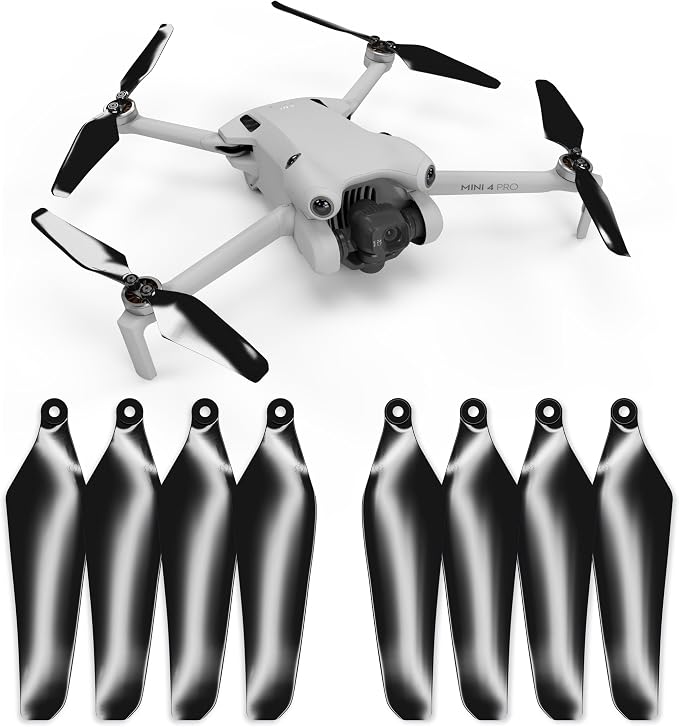
🥇 Master Airscrew Super Stealth Propellers for DJI Mini 4 Pro & Mini 3 Pro
Master Airscrew is a real prop company with decades in RC, not a random listing with 40 keywords in the title, and that’s why these are my go-to replacements for the Mini 4 Pro and Mini 3 Pro. They’re a drop-in fit, they claim around 2 dB lower noise than stock, and the colored options actually help you spot the drone against a grey sky. That last bit sounds like marketing until you lose sight of a Mini at 200 meters.
Downsides: you get 4 props per set, which is one full swap and not much spare. For the price per blade you can find cheaper generic packs, but I’ve had enough cheap props arrive with flash on the edges that I stopped bothering.
Specs: 4 propellers per set, fits DJI Mini 4 Pro and Mini 3 Pro, claimed -2 dB noise reduction, several color options
Best for: Mini 4 Pro / Mini 3 Pro owners who want a quieter, better-made replacement than generic bulk packs
Builder feedback: The quieter sound gets mentioned a lot; a few users say the flight time gain is small enough that you’d need a stopwatch to notice.
🥈 DJI Propellers for Neo
The Neo is the drone people fly indoors, fly off their palm and fly into kitchen cabinets. So the props get chewed up more than on anything else DJI makes, even with the built-in guards. These are genuine DJI props: two pairs (four blades) plus eight M1.2 screws. Use the new screws each time and use the small screwdriver DJI packs with the drone — the wrong driver will cam out and strip these tiny heads before you notice.
It’s a bit of a nuisance that the Neo uses screw-on props at all on a drone this small. Quick-release would’ve been nicer. But they’re cheap and genuine, so I’m not going to complain too loudly.
Specs: 2 pairs of propellers, 8 x M1.2×3.6mm screws, DJI Neo only
Best for: Neo owners who fly indoors or near obstacles and burn through props
Builder feedback: Buyers like knowing they’re the real thing; the main gripe is the tiny screws being easy to drop into carpet. Work over a tray.

🥉 DJI Avata 2 Propellers
The Avata 2 is an FPV cinewhoop, which is a fancy way of saying it’s designed to fly close to things and sometimes into them. The ducts protect the props a lot, but a hard hit or a tumble on concrete still chips blades. These are DJI’s own dynamically balanced props with screws included, marked for the correct CW/CCW arms. Balance matters more on the Avata than on the Minis, because unbalanced props show up straight away as vibration in the footage.
They are not cheap for what’s in the box. If you crash an Avata a lot (no judgement, I’m sure it was the wind), stock up.
Specs: Genuine DJI, dynamically balanced, screws included, CW/CCW marked, DJI Avata 2 only
Best for: Avata 2 pilots who want balanced, vibration-free props for clean footage
Builder feedback: Highly rated for fit and smoothness; the usual complaint is simply the price per set.

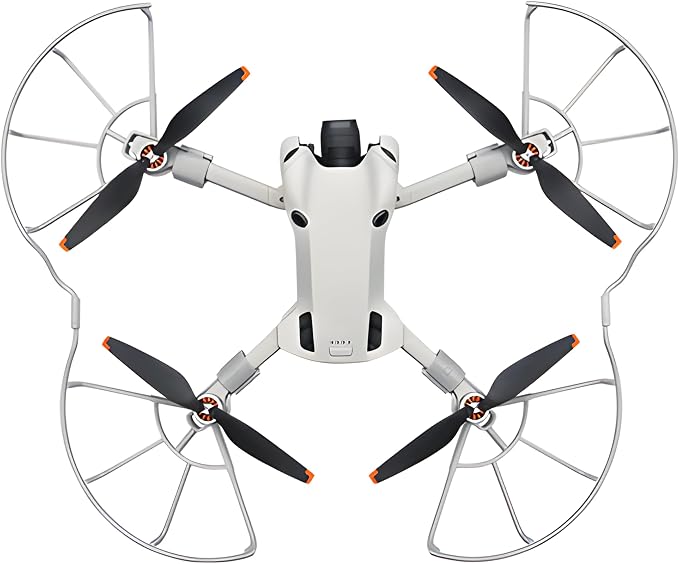
Craznick Propeller Guard for DJI Mini 4 Pro
If you’re new, or flying near trees and buildings, prop guards save props, walls and fingers. This one clips on with buckles, no tools, and is made from reasonably tough ABS. I used a set like this for the first few weeks with my Mini and it paid for itself the first time I clipped a hedge.
The honest drawbacks: guards add weight and catch wind, so flight time drops and the drone gets pushed around more in gusts. And it’s Mini 4 Pro only — it does not fit the Mini 4K or Mini 5 Pro, so check before ordering. Take them off once you’re confident.
Specs: ABS construction, tool-free buckle mounting, DJI Mini 4 Pro only (not Mini 4K / Mini 5 Pro)
Best for: New pilots, indoor practice, and flying close to obstacles
Builder feedback: Generally fits well and does its job; some owners find the clips a bit stiff at first and note the flight time hit in wind.
Batteries & Charging: The Part That Wears Out First
Every drone battery is a consumable. It’s a LiPo with a nice plastic jacket and a chip inside, and the same rules apply as for the packs in your planes: don’t store it full, don’t store it empty, don’t fly it down to zero, and retire it if it swells. DJI batteries will self-discharge to a storage level after sitting for a while, which is great — but if you leave one for months it can still go too low to wake up. Charge your packs every couple of months in the off-season. For more on LiPo basics, see our LiPo battery guide.
A word on third-party DJI batteries: Amazon is full of “compatible” packs with bigger mAh numbers and very enthusiastic reviews. Some are fine. Some have firmware quirks or don’t report cell health properly. For something that sits under a spinning drone above people’s heads, I stick with genuine DJI.
🥇 DJI Mini 4 Pro Intelligent Flight Battery
The standard 2590 mAh battery that keeps the Mini 4 Pro (and Mini 3 Pro) under the 250 g mark. DJI rates it at up to 34 minutes, which in real flying with some wind and a bit of hovering is more like the low-to-mid 20s before you want to be landing. It’s genuine DJI, it reports cell health in the app, and it’s the one I’d buy first if a battery went puffy or you just want a second or third flight per outing.
The drag: DJI prices its batteries like they know you don’t have a choice. And they’re not the “long” version — see the Plus below if you don’t care about the weight class.
Specs: 2590 mAh, up to 34 min rated flight time, keeps drone under 250 g, fits DJI Mini 4 Pro and Mini 3 Pro
Best for: Replacing a worn or swollen stock battery, or adding flights while keeping the sub-250 g weight
Builder feedback: Solidly rated by owners, mostly for reliability; the common grumble is price.

🥈 DJI Intelligent Flight Battery Plus (Mini 4 Pro / Mini 3 Series)
The bigger pack. DJI rates it at 47 minutes on a Mini 3 Pro and 51 on a Mini 3, and it fits the Mini 4 Pro too. That’s a big upgrade for anyone who flies long mapping-style or landscape sessions. The catch — and it’s a real one — is that with the Plus fitted, your drone weighs more than 249 g. In the US that means registering it with the FAA even for recreational flying, and in some other countries it moves you into a different category. Check your local rules before you fly with it.
Specs: Extended-capacity pack, up to 47 min (Mini 3 Pro) / 51 min (Mini 3) rated, drone goes over 249 g, fits Mini 4 Pro, Mini 3 Pro, Mini 3
Best for: Pilots who want the longest flight time and are fine with the extra weight and paperwork
Builder feedback: Owners love the flight time; a few mention the drone feels a touch less nimble and more sluggish in climbs with the heavier pack.

🥉 DJI 30W USB-C Two-Way Charging Hub (Mini 4 Pro / Mini 3 Series)
Not a repair part exactly, but it’s the fix for “why are my batteries always at different levels”. The hub holds three batteries, charges them one after another (highest charge first), and can also work as a power bank to charge your phone or the remote from leftover battery juice. It’s also a tidy way to carry batteries so the contacts don’t get bashed around in your bag.
Two gripes. It charges in sequence, not all at once, so three packs take a few hours. And the box contains the hub only — you need a decent USB-C charger (DJI suggests its 30W one) to get the advertised speed. Plugging it into a weak phone brick is a good way to spend your whole afternoon waiting.
Specs: Holds 3 batteries, sequential charging, power-bank output, hub only (charger not included), fits Mini 4 Pro, Mini 3 Pro, Mini 3 batteries
Best for: Anyone with two or more Mini batteries who wants simple charging and tidy storage
Builder feedback: Very well rated; the “charger not included” surprise shows up in a lot of comments.

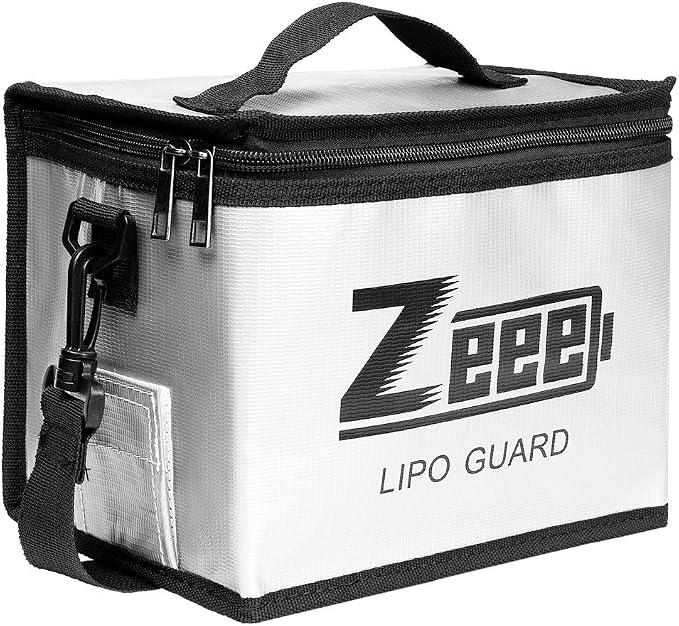
Zeee Fireproof LiPo Safe Bag
If you own a battery that’s even slightly puffy and you’re waiting to recycle it, this is where it lives until then. Also where I charge anything overnight. Zeee is a big name in hobby LiPos and this bag is the one half the RC world owns. At about 8.5 x 6.5 x 5.7 inches it fits several DJI Mini batteries or a couple of plane packs.
Keep your expectations realistic: it’s rated to insulate up to around 1000°F and reduces risk, it doesn’t make a battery fire harmless. Still use it on a non-flammable surface. And the zipper is a bit cheap feeling.
Specs: Approx. 8.46 x 6.5 x 5.71 in, fireproof inner fabric with flame-retardant layer, zip closure
Best for: Charging and storing drone and plane batteries, and quarantining a swollen pack
Builder feedback: Massively popular in the RC hobby; the complaints are mostly about the zipper and smell out of the box.
Planes and drones share a lot of LiPo gear. If you’re charging normal packs as well, our LiPo charger guide goes deeper.
Arms, Hinges & Landing Gear: Frame Repairs
This is the section where you’ll actually open the drone. My advice: watch a teardown video for your exact model first, take photos at every step, and put screws in a magnetic tray or egg carton in the order they came out. The Mini’s screws come in a few different lengths and they are not interchangeable if you like your circuit boards unpunctured.
🥇 Front Arm Axis (Hinge) Replacement for DJI Mini 4 Pro / Mini 3
The most common “real” repair on the Mini 3 and Mini 4 Pro. If a front arm is loose, wobbly, won’t stay locked open or the hinge has visibly cracked, this is the part. It replaces the front arm shaft/hinge and comes with small repair tools, so for a lot of people it’s a one-evening fix instead of a trip to a repair shop.
It’s a generic brand, not DJI, and the included tools are basic — use a proper driver (see iFixit below) on the screws. Also triple-check you order the right side and model; the listing is Mini 4 Pro and Mini 3 only.
Specs: Front arm shaft/hinge replacement, repair tools included, fits DJI Mini 4 Pro and Mini 3
Best for: Floppy or cracked front arm hinges after a sideways hit
Builder feedback: Well reviewed for fit; several people say the job is fiddlier than it looks and a video walkthrough is essential.

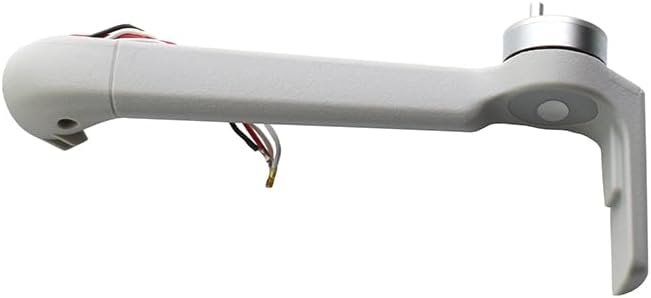
🥈 Jakoly Front Right Motor Arm with Motor for DJI Mini 4 Pro
For when the arm itself is snapped, or the motor is dead or grinding and a blast of air didn’t save it. This is a complete arm with the motor already fitted. Listings are split by position (front left, front right, rear left, rear right) — this link is front right, and there are matching versions for the other corners from the same store, so check which corner you actually broke. I’d say that twice if I could.
This is the hardest job in the article. You’ll be opening the shell and dealing with small connectors near the ESC board. Not rocket science, but not a beginner’s first repair either. Reviews are fewer than on the other items here, simply because it’s a niche part, though they’re positive.
Specs: Complete motor arm with motor pre-installed, front right position, DJI Mini 4 Pro only
Best for: Snapped arms or failed motors on a Mini 4 Pro when you’d rather not pay shop rates
Builder feedback: Buyers report good fit and working motors; the main advice from them is to confirm the arm position before ordering.
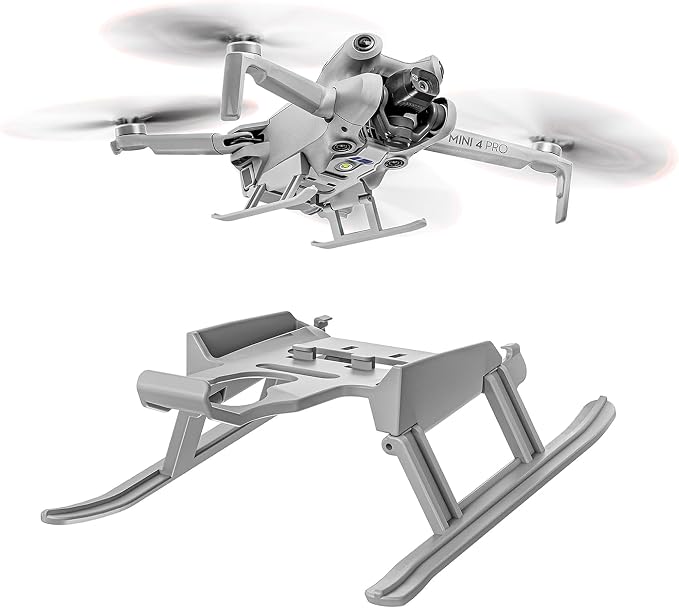
🥉 Tosiicop Foldable Landing Gear for DJI Mini 4 Pro
An upgrade, not a repair — but it prevents repairs. The Mini 4 Pro sits very low, so the gimbal and camera are close to whatever you’re landing on. These legs raise it about 20 mm, weigh around 13 g, fold for storage and go on without tools. That extra clearance keeps grass off the gimbal and gives you a little room when you misjudge a landing on uneven ground.
Minus points: 13 g isn’t nothing on a drone that lives right at the 249 g line, so if staying under 250 g matters to you legally, weigh the whole setup. And hand-catching gets a bit more awkward with legs sticking out.
Specs: Approx. 20 mm height increase, about 13 g, foldable, tool-free install, DJI Mini 4 Pro
Best for: Taking off and landing from grass, dirt or uneven ground
Builder feedback: Liked for how easily it clips on; a few note it can wobble slightly if not pushed fully home.
Gimbal & Camera Protection and Repair
The gimbal is the most expensive and delicate part of these drones, and most gimbal damage happens either in the bag or on the ground, not in the air. Protecting it is cheap. Repairing it is not always.
🥇 Craznick Gimbal Protector Cover for DJI Mini 4 Pro
A clear polycarbonate cover that snaps over the gimbal and front sensors for transport. The stock DJI one does the same job, but they get lost (ask me how I know) and a spare is cheap. It keeps the lens from getting scratched and stops the gimbal from being knocked around inside your bag, which is how a lot of “mystery” gimbal errors begin.
The one thing to remember: take it off before you power the drone on. The gimbal runs a self-check at startup, and if it can’t move you’ll get an overload error. Every drone owner does this at least once. Consider it a rite of passage.
Specs: PC (polycarbonate) cover, protects lens and front sensors, DJI Mini 4 Pro
Best for: Replacing a lost stock cover or keeping a spare in every bag
Builder feedback: Well rated for fit; some find it snaps on a little tighter than the original.

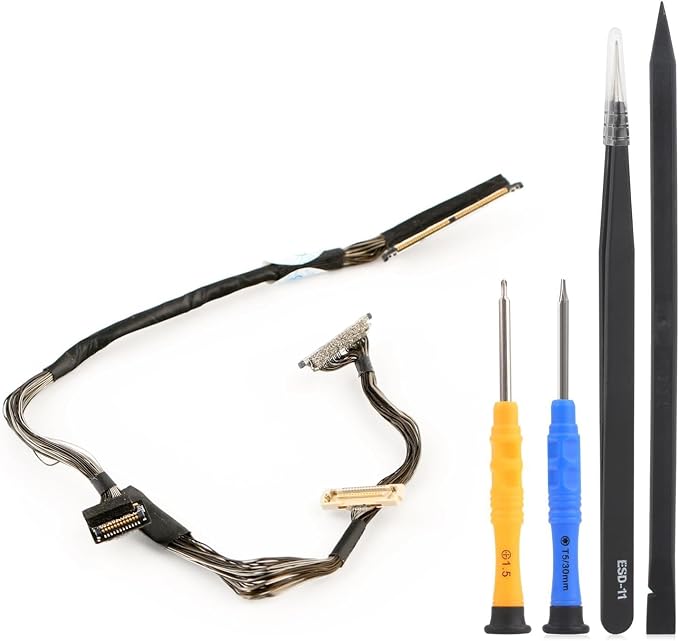
🥈 Gimbal Signal Cable Replacement for DJI Mini 3 / Mini 3 Pro
After a crash that hit the camera, persistent gimbal errors or a missing/flickering video feed are often down to the thin flat ribbon cable that runs from the gimbal into the body. It’s a known weak point on the Mini 3 series, and this replacement cable comes with basic repair tools. If the gimbal motors themselves are fine, swapping this cable is often all it takes.
Fair warning: this is delicate work. Ribbon connectors are tiny, the cable folds in a specific way, and a slip with a tool can tear it. Take it slow and good light helps a lot. It’s for Mini 3 and Mini 3 Pro only — the Mini 4 Pro uses a different cable, so don’t mix them up.
Specs: Gimbal camera signal flex cable, repair tools included, DJI Mini 3 and Mini 3 Pro only
Best for: Gimbal errors or no video after a camera-first crash on a Mini 3 / Mini 3 Pro
Builder feedback: Positive overall; reviewers who struggled mostly say it was the routing of the cable, not the part.
Tools & Field Gear
You don’t need a full electronics bench to fix a drone. One good driver kit and some sensible habits at the field will cover most of it. If you already build planes, check our glue guide too — a dab of CA is handy for re-securing a cracked plastic landing foot, as long as you keep it far away from motors and the gimbal.
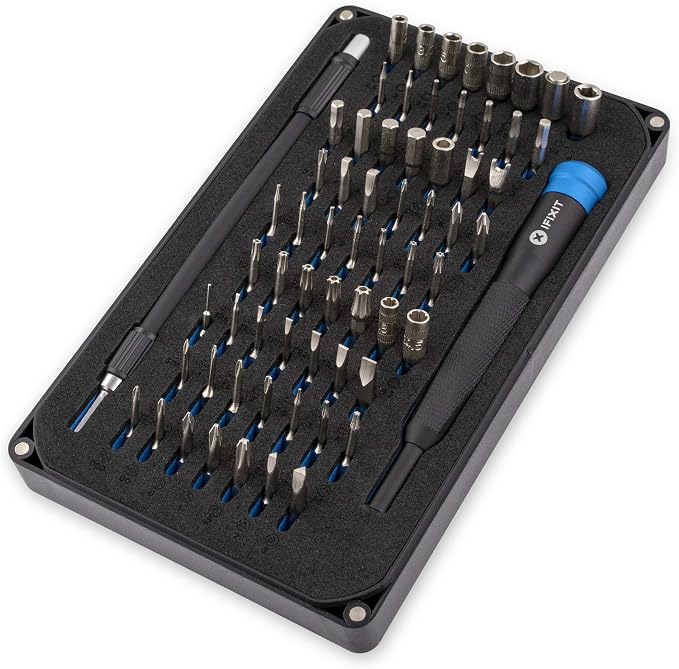
🥇 iFixit Mako Driver Kit – 64 Precision Bits
The single best thing you can buy for drone repair, and it’ll fix your phone, laptop and kid’s game console too. DJI’s screws are tiny and soft, and the cheap drivers that come with repair parts round them off very easily. The Mako has proper-quality bits in all the small Phillips, Torx and odd security sizes, an aluminium handle with a magnetic socket and a flexible extension. iFixit is the repair-guide company, so the kit is built by people who actually take things apart for a living.
Negatives? It costs more than the no-name 100-in-1 kits, and you’ll use about four of the 64 bits for drone work. I still think it’s worth it; a stripped screw inside a drone is a very bad evening.
Specs: 64 precision bits (Phillips, Torx, Pentalobe, tri-wing and more), aluminium handle with magnetic socket, flex extension, magnetic storage case
Best for: Every DIY drone repair — and most small electronics
Builder feedback: One of the most highly rated tool kits on Amazon, period. Complaints are rare and mostly about wanting a second handle.
🥈 Hoodman LP21 Weighted Trifold Drone Landing Pad
Prevention again. Every takeoff from dirt or sand sprays grit into your motor bearings and onto the camera lens, and tall grass loves to grab props. A landing pad fixes that for pennies per flight. The Hoodman is weighted (about 1.9 lb) so it doesn’t need stakes and doesn’t blow away in the downwash, springs open when you unfold it, and folds down small. It fits the Mini 4 Pro, Mini 3 Pro and bigger Mavics.
It’s heavier to carry than the ultra-light nylon pads, and the twist-fold takes a couple of tries the first time. After that, it’s muscle memory.
Specs: Weighted trifold design (approx. 1.9 lb), no stakes needed, vinyl coated, folds to about one-sixth of open size
Best for: Keeping motors and gimbal clean when flying from grass, dirt, sand or gravel
Builder feedback: Loved for staying put in wind without stakes; the only real complaint is weight.

Comparison Table
| Product | Type | Fixes / Prevents | Fits | DIY Difficulty |
|---|---|---|---|---|
| Master Airscrew Super Stealth Props | Propellers | Chipped props, vibration, noise | Mini 4 Pro, Mini 3 Pro | Easy |
| DJI Propellers for Neo | Propellers | Chipped props | Neo | Easy |
| DJI Avata 2 Propellers | Propellers | Chipped props, footage vibration | Avata 2 | Easy |
| Craznick Propeller Guard | Upgrade | Prop and obstacle strikes | Mini 4 Pro | Easy |
| DJI Mini 4 Pro Flight Battery | Battery | Worn or swollen battery | Mini 4 Pro, Mini 3 Pro | Easy |
| DJI Flight Battery Plus | Battery upgrade | Short flight time | Mini 4 Pro, Mini 3 Pro, Mini 3 | Easy |
| DJI Two-Way Charging Hub | Charging | Charging hassle, battery transport | Mini 4 Pro / Mini 3 series batteries | Easy |
| Zeee LiPo Safe Bag | Safety | Charging/storage fire risk | Any LiPo | Easy |
| Front Arm Axis Replacement | Repair part | Broken front arm hinge | Mini 4 Pro, Mini 3 | Medium |
| Jakoly Motor Arm with Motor | Repair part | Snapped arm, dead motor | Mini 4 Pro | Hard |
| Tosiicop Landing Gear | Upgrade | Gimbal ground strikes, debris | Mini 4 Pro | Easy |
| Craznick Gimbal Protector | Protection | Lens scratches, gimbal knocks in transport | Mini 4 Pro | Easy |
| Gimbal Signal Cable | Repair part | Gimbal errors, no video after crash | Mini 3, Mini 3 Pro | Hard |
| iFixit Mako Driver Kit | Tool | Stripped screws | Everything | — |
| Hoodman LP21 Landing Pad | Field gear | Grit in motors and gimbal | Mini, Air, Mavic | — |
My Basic Post-Crash Checklist
- Power off and remove the battery straight away. Check the battery case for cracks or swelling.
- Inspect every prop. Any chip or crack, replace it with new screws.
- Gently fold and unfold each arm. It should lock open firmly with no wobble.
- Spin each motor by hand. It should feel smooth, not gritty. Blow out debris with gentle compressed air.
- Check the gimbal moves freely by hand (gently!) and has no grass or dirt stuck in it.
- Power up, update firmware if prompted, and run IMU and compass calibration in DJI Fly.
- Test hover at low height for a minute before flying anywhere far or high.
FAQ
Can I still buy DJI drone parts in the US in 2026?
Yes, for now. The FCC’s December 2025 Covered List decision blocks new DJI models from being approved, but models approved before that — including the Mini 4 Pro, Mini 5 Pro, Neo, Air 3S and Avata 2 — can still be sold, and batteries, props and spare parts for them are available on Amazon as of September 2026. Stock of some genuine DJI items has been running low, so it’s sensible to keep a spare battery and a couple of prop sets on hand.
Is it safe to fly with a slightly chipped propeller?
No. A small chip unbalances the prop, adds vibration and can lead to a crack that lets go in flight. Props are cheap; replace any that are chipped, cracked or bent.
My DJI battery won’t turn on after storage. Is it dead?
Often it’s just deeply discharged. Try leaving it on the official charger or charging hub for a while — many recover. If it still won’t wake up, shows a cell error in the app, or is swollen in any way, retire it and recycle it properly.
Does adding landing gear or a bigger battery affect the 250 g limit?
Yes. The Intelligent Flight Battery Plus pushes a Mini 4 Pro or Mini 3 over 249 g on its own, and accessories like landing gear or prop guards add weight too. In the US, a drone of 250 g or more needs FAA registration even for recreational flying. Rules differ elsewhere, so check yours.
What’s the easiest DIY drone repair for a beginner?
Props and batteries, followed by the front arm hinge on a Mini 3 or Mini 4 Pro. Motor arm and gimbal cable swaps are more involved and best attempted after watching a full teardown for your model.
Final Thoughts
Most drone damage is boring and fixable. Props and batteries account for the majority of it, a hinge or arm for most of the rest, and a good landing pad and gimbal cover prevent a surprising amount of the damage in the first place. Get a proper driver kit, keep spares in the bag, and don’t be afraid to open the thing up — it’s a lot less scary than it looks, and a lot cheaper than a new drone, especially now that “new” might not be an option for much longer. Props to you for fixing it yourself instead of binning it. (Sorry. I did warn you about the puns.)
Related Guides
- Best LiPo Batteries for RC Airplanes — LiPo basics that apply to drone batteries too
- Best LiPo Battery Chargers for RC Airplanes — safe, balanced charging for all your packs
- Best Propellers for RC Airplanes — the theory behind pitch, diameter and balance
- Best RC Flight Simulator Software — practice so there’s less to repair
- Best FPV Cameras & Goggles — if the Avata got you hooked on FPV
- Best RC Airplane Accessories — field gear that crosses over to drones